
1 : PHP for junior developers
Alles op Gitlab of Github!
Zorg er voor dat alle opdrachten in gitlab of github worden gezet. Dit mag gewoon een eigen publieke repository zijn, of vraag aan je collega's om een repository aan te maken waarmee je kan werken.
Sources for PHP
In programming, the search engine is your best friend for filling knowledge gaps and learning from other programmers. Best practices are always important. Note that not all information is a best practice. Losts of code snippets are experimental and not all self titled experts are real experts. Always verify information and look for multiple examples if you need inspiration. Furthermore, there are always interesting websites for different programming languages. Make sure that searching with Google, for example, is well controlled.
Google search explenations:
https://support.google.com/websearch/answer/134479?hl=en
https://google.com
PHP.net manual
Everything you about PHP can be found on this website.
https://www.php.net/
Books for junior developers
https://doc.lagout.org/programmation/tech_web/php/PHP%20%26%20MySQL%20Everyday%20Apps%20for%20Dummies.pdf
https://assets.ctfassets.net/nkydfjx48olf/5qFMF3mvitLMahX67i7iOb/028229996c13cbc27a0538f055a41b46/php_cookbook.pdf
Learning / Course sites.
https://www.w3schools.com/php/default.asp
https://phpenthusiast.com/object-oriented-php-tutorials
Opdracht 1.1 : De som van A & B
Opdracht 1.1.1
Bekijk onderstaande code, uitgaande van het feit dat de methode som is geïmplementeerd, en voorspel de werking en voorzie de code van duidelijk en commentaar die de functionaliteit beschrijft (dus niet een vertaling is van php -> nederlands/engels).
//.....

settype($antwoord, "integer");

$a = 1;
$b = 2;
calculate::som($antwoord, $a, $b);
echo "som1 : $a + $b = $antwoord".PHP_EOL;

$a = 4;
$b = 6;
calculate::som($antwoord, $a, $b);
echo "som2 : $a + $b = $antwoord".PHP_EOL;

calculate::som($antwoord, 1, 3);
echo "som3 : $antwoord".PHP_EOL;
Opdracht 1.1.2
Implementeer de methode som, zodat deze op identieke manier als hierboven te zien is, gebruikt kan worden. Voorzie de code van duidelijk en commentaar die de functionaliteit beschrijft (dus niet een vertaling is van php -> nederlands/engels). Het resultaat moet er als volgt uit zien:

Opdracht 1.1.3
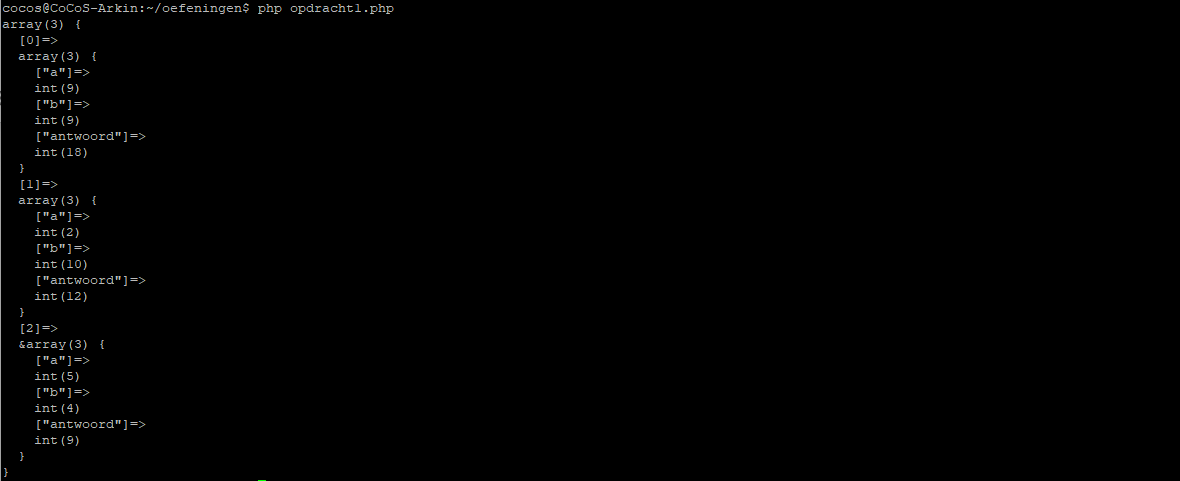
Vul nu een array met 10 sommen en zorg er voor dat middels de ontwikkelde functie "antwoord" per som brekend wordt en dat het resultaat van de array getoond wordt middels var_dump($opgave). Voer de opdracht een keer uit met een for loop, while loop en met een foreach voor de itteratie van $opgave. Voorzie de code van duidelijk en commentaar die de functionaliteit beschrijft (dus niet een vertaling is van php -> nederlands/engels).
//......

$opgave = array();
for ($i=0; $i<3; $i++){
  $opgave[]=array(
    "a"=>rand(0,10),
    "b"=>rand(0,10),
    "antwoord"=>0
  );
}

// schrijf hieronder de code die nodig is om de in de array
// staande berekeningen uit te voeren en middels var_dump($a)
// te presenteren.
//
..... oplossing hier .......
verwachte output:
Opdracht 1.1.4
Bespreek de opdracht met je collega's.
Opdracht 1.1.5
Pas je implementatie van de methode som zo aan dat het aantal getallen dat opgeteld kan worden flexibel is. Zie onderstaande implementatie voorbeeld. Voorzie de code altijd van duidelijk en commentaar die de functionaliteit beschrijft (dus niet een vertaling is van php -> nederlands/engels).
//.....
calculate::som($c, 1, 3, 6, 10);
echo "$c";

calculate::som($c, 3,5,4,4,6,2,3,34,54,2,23,54,5);
echo "$c";

calculate::som($c, 3,5);
echo "$c";
resultaat:

Tips & Trics
Zorg er voor dat je weet hoe je moet omgaan met argumenten in functies en hoe je informatie via de argumenten van een functie kan teruggeven.
Ga aan de slag met de tutorial PHP Functions van W3 Schools.
Opdracht 1.2 : Curl + Productdatabase (met MySQL)
Opdracht 1.2.1
In deze opdracht gaan we aan de slag met informatie uit een database die via een curl-request uit vanaf een webserver gehaald wordt.
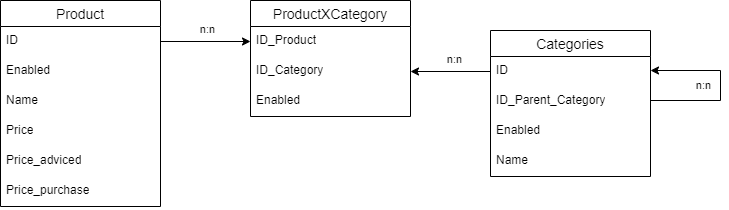
Maak een database aan een beschikbare MySQL server en zet daar de onderstaande tabellen in. Je hoeft nog geen referentiele integriteit af te dwingen met foreign key's. Zorg er voor dat je nieuwe entiteiten automatisch een nieuwe opvolgend ID nummer krijgen. Daarnaast is het belangrijk dat elke combinatie van product en categorie uniek moet zin in de tabel ProductXCategroy, immers het is niet logisch dat één product twee keer gekoppeld is aan éénzelfde categorie.
Let op, zorg er voor dat het field "Enabled" in alle tabellen standaard op true staat EN dat prijzen niet NULL zijn als een record wordt aangemaakt.
Opdracht 1.2.2
Maak een class waarmee een MySQL verbinding kan worden aangemaakt en waarmee een querie kan worden uitgevoerd. Het opzetten van een connectie met de database via een eigen class is veelal best practice om data te verwerken en te zorgen dat queries eenduidig uitgevoerd worden en centraal worden beveiligd tegen bijvoorbeeld sql injections. Door gebruik te maken van een eigen class kan voorkomen worden dat bug-fixes en wijzigingen m.b.t. interactie met mysql op vele plaatsen moeten worden uitgevoerd.
<?php

/**
*
* Example Class for executing queries and maintaining connection to a mysql
* server in a controlled way using a persistant or non-persistant (enterprise)
* connection method.
*
* Documentation is setup up to be compatible with php Documenter
* for information see : https://www.phpdoc.org/
*
* @package Example
*	 $dbConnection = new mysqlConnector($dbUser, $dbPass, $dbName);
*	 if ($dbConnection->query("SELECT FieldA, FieldB FROM TableA")){
*		$results = $connection->getLastResult();
*	 }
*	 else{
*	    $Executing Query Faild.
*	 }
*
* @author A. Hagoort / Concera Software
* @version $Revision: 0.0 $
* @access public
* @see http://concera.software/
*
*/
class mysqlConnector{

	// @var string $user used for the database connection
    private $user = "";

	// @var string $password used for the database connection
    private $password = "";

	// @var $database name of the database hosted on the database connection
    private $database = "";

	// @var string $host ip or name on whitch the mysql service is running. By default this is 127.0.0.1 or localhost.
    private $host = "";

	// @var mysqli $dbConnection (connection) to the database server.
    private $dbConnection = null;

	// @var bool $dbConnectable state (tested connection settings).
    private $dbConnectable = false;

	// @var bool $connected to the database if true, if not connected value is false.
    private $dbIsConnected = false;

	// @var bool $persistantConnection is a connection that is maintained througout the lifetime of the class instance. A non persistant connection is used to connect and disconnect(close) every time a query is executed. Non persistant connections are believed to be the best practice option an enterprise environments but keep in mind that the performance for a single client drops when executing a lot of queries.
    private $persistantConnection = false;

	// @var bool $useEventsOnError enables exeptions when errors occure in the class if set to true.
	private $useEventsOnError = false;

	// @var mysqli $lastQueryResult holds the last result of an query.
    private $lastQueryResult;

    /* constructor voor het initieren van de class. verwerk hierin al zoveel
    *  als mogelijk connectie-gegevens.
	*
	*  @param string $user used for the database connection
	*  @param string $password used for the database connection
	*  @param string $databse name of the database hosted on the database connection
	*  @param string $host ip or name on whitch the mysql service is running. By default this is 127.0.0.1 or localhost.
	*
    */
    function __construct($user, $password, $database, $host){
    }

    /* method to call on destructing the instance of the class.
	*
    */
    function __destruct(){
    }

    /* method to enable the persistant connection to the database. Do not use
	*  this option when working in a enterprise or high load environment because
	*  persistant connections, especially when using large queries (never a good
	*  idea), depress the performance of the database service.
	*
    */
	public function enablePersistantConnection() : void {
	}

    /* method to disable the persistant connection to the database. If the
	*  connection is disabled, on every execute a connection is setup to the
	*  database service and when done, the connection is closed. This option
	*  is used on high load systems / enterprise systems to avoid too many
	*  standing connections that can limit the performance of the database
	*  service or application.
	*
    */
	public function disablePersistantConnection() : void {
	}

	/* method to test the connection by connecting and disconnecting a single time and
	*  when the resultcode is true.
	*/
	private function tryConnect() : bool {
	}

    /* activate the database connection and store it's connection state and connectability in the
	*  class properties $dbConnected and $dbConnectable. For information on how to connect to mysql
	*  in php see:
	*  https://www.php.net/manual/en/mysqli.construct.php
	*
	*  @return bool state of the connection, true if success on connection.
    */
    private function connect() : bool{
    }

    /* disconnect from the database server if the connection was still pending.
	*  For informatino see: https://www.php.net/manual/en/mysqli.construct.php
    *
	*  @return bool true when connection is closed, false when the close gave an error.
    */
    public function close(){
    }

    /**
	*  voer een query uit op de mysql server. Zorg dat queries. niet gevoelig zijn voor
	*  sql-injections.
    *
	*  @param string $query to be executed
	*
	*  @return bool true when the querie was executed sucessfully without errors, false if connection failed, and a number > 0 stating the resultcode of the query.
	*/
    public function query($query) : bool|int{
    }

    /**
	*  voer een query uit op de mysql server. Zorg dat queries. niet gevoelig zijn voor
	*  sql-injections.
    *
	*  @param string $keepResults when false, deletes the resultset of the last executed query.
	*
	*  @return bool true when the querie was executed sucessfully.
	*/
    public function getLastResult($keepResults = true){
    }

    /**
	*  return the last
    *
	*  @return bool true when the querie was executed sucessfully
	*  @return array when the an error occured on the last query. The array contains the errornumber and the error message (information).
	*
	*/
    public function getLastError() : bool|array {
    }

    /**
	*  return the resultcode of the last executed query.
	*
	*  @return int the result code of the last executed querie.
	*/
    public function getLastErrNo() : int {
    }

    /**
	*  get the current connection state of the class.
	*
	*  @return int the result code of the last executed querie.
	*/
    public function isConnected() : bool {
    }

    /**
	*  get the connectability (tested connection) state of the class.
	*
	*  @return int the result code of the last executed querie.
	*/
    public function isConnectable() : bool {
    }
}
Als je de class af hebt voer dan de volgende queries middels aanroep van de query methode in de class van je mysql connector. Zorg er voor dat eventuele data die uit de queries komt in json getoond wordt.
Query 1
INSERT INTO Product (name, price) VALUES ('geraspte kaas', 2.42), ('ketchup', 1.38), ('ribbelships', 1.99)
Query 2
SELECT name, price FROM Product
Opdracht 1.2.3
Vul de database middels een PHP script met 100 fictieve producten, 10 fictieve categorieën. De 100 producten moeten gelinkt worden aan de categorieën via kruistabel (cross tabel). Zorg er voor dat in de kruistabel 200 verbindingen staan waarbij elk product minstens in één categorie is ingedeeld en sommige producten in 2 of meer categorieën. Zorg voor de toepassing van kennis uit opdracht één. Maak gebruik gebruik van OOP door bijvoorbeeld een class te maken met functies als addProduct, addCategory, linkProductAndCategory in een class productManager.
Concreet:
- maak de class mysqlConnector om de vebinding met de database te verzorgen en te zorgen dat queries uitgevoerd kunnen worden.
- Maak een class products met daarin de voorgestelde functies (methoden).
- Zorg er voor dat producten geen verkoopprijs (price) of adviesprijs (price_advised) mogen hebben die onder de inkoopprijs (price_purchase) ligt.
Voorbeeld:
$mysqlConnection = new mysqlConnector($user, $password. $databaseName);
$shop = new productManager($mysqlConnection);

$shop->addProduct(true,$productName1,$price,$price_added,$price_purchase);
$shop->addProduct(true,$productName2,$price,$price_added,$price_purchase);
$shop->addProduct(true,$productName3,$price,$price_added,$price_purchase);
$shop->addProduct(true,$productName4,$price,$price_added,$price_purchase);
$shop->addProduct(true,$productName5,$price,$price_added,$price_purchase);

$shop->addCategory(true,$categoryName1);
$shop->addCategory(true,$categoryName2);

$shop->linkProductAndCategoryByName($productName1, $categoryName1);
$shop->linkProductAndCategoryByName($productName2, $categoryName1);
$shop->linkProductAndCategoryByName($productName3, $categoryName2);
$shop->linkProductAndCategoryByName($productName4, $categoryName1);
$shop->linkProductAndCategoryByName($productName5, $categoryName1);
$shop->linkProductAndCategoryByName($productName5, $categoryName2);


$shop->commitChanges();
Opdracht 1.2.4
Maak in de product class (waarvoor we in opdracht 1.2.3. als voorbeeld de naam productManager gebruikt hebben) een 2tal export functies voor de producten. Eén functie moet exportJSON zijn en één exportXML. Beide functies moeten de database output geven op een manier vergelijkbaar zoals hieronder.
Voorbeeld JSON output
{
	"products":
	{
		"1":
		{
			"id": "1",
			"name": "product 1",
			"price": "1.00",
			"categories":
			{
				"1":
				{
					"enable": true,
					"name": "categorie 1"
				}
			}
		},
		"2":
		{
			"id": "2",
			"name": "product 2",
			"price": "10.00",
			"categories":
			{
				"2":
				{
					"enable": true,
					"name": "categorie 2"
				}
			}
		},
		"3":
		{
			"id": "3",
			"name": "product 3",
			"price": "5.00",
			"categories":
			{
				"3":
				{
					"enable": true,
					"name": "categorie 3"
				}
			}
		},
		"4":
		{
			"id": "4",
			"name": "product 4",
			"price": "15.00",
			"categories":
			{
				"1":
				{
					"enable": true,
					"name": "categorie 1"
				},
				"4":
				{
					"enable": true,
					"name": "categorie 4"
				}
			}
		},
		"5":
		{
			"id": "5",
			"name": "product 5",
			"price": "11.00",
			"categories":
			{
				"2":
				{
					"enable": true,
					"name": "categorie 2"
				},
				"3":
				{
					"enable": true,
					"name": "categorie 3"
				}
			}
		}
	}
}
Voorbeeld XML output
<?xml version="1.0"?>
<root>
	<products>
		<item1>
			<id>1</id>
			<name>product 1</name>
			<price>1.00</price>
			<categories>
				<item1>
					<enable>1</enable>
					<name>categorie 1</name>
				</item1>
			</categories>
		</item1>
		<item2>
			<id>2</id>
			<name>product 2</name>
			<price>10.00</price>
			<categories>
				<item2>
					<enable>1</enable>
					<name>categorie 2</name>
				</item2>
			</categories>
		</item2>
		<item3>
			<id>3</id>
			<name>product 3</name>
			<price>5.00</price>
			<categories>
				<item3>
					<enable>1</enable>
					<name>categorie 3</name>
				</item3>
			</categories>
		</item3>
		<item4>
			<id>4</id>
			<name>product 4</name>
			<price>15.00</price>
			<categories>
				<item1>
					<enable>1</enable>
					<name>categorie 1</name>
				</item1>
				<item4>
					<enable>1</enable>
					<name>categorie 4</name>
				</item4>
			</categories>
		</item4>
		<item5>
			<id>5</id>
			<name>product 5</name>
			<price>11.00</price>
			<categories>
				<item2>
					<enable>1</enable>
					<name>categorie 2</name>
				</item2>
				<item3>
					<enable>1</enable>
					<name>categorie 3</name>
				</item3>
			</categories>
		</item5>
	</products>
</root>
Voorbeeld ARRAY output
array (
  'products' =>
  array (
    1 =>
    array (
      'id' => '1',
      'name' => 'product 1',
      'price' => '1.00',
      'categories' =>
      array (
        1 =>
        array (
          'enable' => true,
          'name' => 'categorie 1',
        ),
      ),
    ),
    2 =>
    array (
      'id' => '2',
      'name' => 'product 2',
      'price' => '10.00',
      'categories' =>
      array (
        2 =>
        array (
          'enable' => true,
          'name' => 'categorie 2',
        ),
      ),
    ),
    3 =>
    array (
      'id' => '3',
      'name' => 'product 3',
      'price' => '5.00',
      'categories' =>
      array (
        3 =>
        array (
          'enable' => true,
          'name' => 'categorie 3',
        ),
      ),
    ),
    4 =>
    array (
      'id' => '4',
      'name' => 'product 4',
      'price' => '15.00',
      'categories' =>
      array (
        1 =>
        array (
          'enable' => true,
          'name' => 'categorie 1',
        ),
        4 =>
        array (
          'enable' => true,
          'name' => 'categorie 4',
        ),
      ),
    ),
    5 =>
    array (
      'id' => '5',
      'name' => 'product 5',
      'price' => '11.00',
      'categories' =>
      array (
        2 =>
        array (
          'enable' => true,
          'name' => 'categorie 2',
        ),
        3 =>
        array (
          'enable' => true,
          'name' => 'categorie 3',
        ),
      ),
    ),
  ),
)
Opdracht 1.2.5
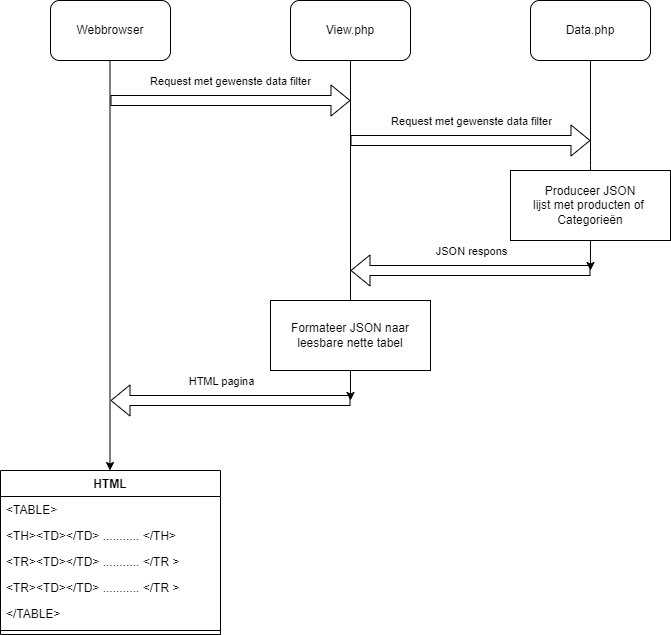
Maak een php script aan dat in de webbrowser de volgende functie kan uitvoeren door gebruik te maken van een parameter in de request van het bestand. De respons van het script moet in JSON worden afgegeven.
Data die het php script moet kunnen produceren in JSON :
- Alle producten
- Alle categoriën
- Alle producten uit één categorie
- Een categorie op basis van een specifieke zoekterm
- Een product op basis van een specifieke zoekterm
- Producten op basis van een minimale en maximale prijs
- Producten met een minimale (bijvoorbeeld 10%) korting t.o.v. de adviesprijs.
Belangrijk, de output moet echt in valide json worden gepresenteerd in de respons van het webrequest.
Opdracht 1.2.6
Maak een PHP script aan dat de JSON ophaald uit het eerder geprogrammeerde script via een webrequest en de data "Human Readable" bijvoorbeeld netjes in een HTML tabel, in een webpagina toont.
Opdracht 1.3 : Datamanipulatie
Onderstaande opdrachten zijn bedacht als oefening voor datamanipulatie.
Opdracht 1.3.1
Maak een class die een array van woorden en leestekens kan omzetten naar zin met correcte spatiëring. Deze opdracht moet binnen 30 minuten uitgevoerd kunnen worden. Hieronder de start van het programma. De oplossing mag niet meer dan 1 regel betreffen.
<?php

$vraag = [
   "Hallo",
   ",",
   "hoe",
   "gaat",
   "het",
   "?",
];


// zorg voor een goed gespatiëerde zin in 1 regel code.
....
Not yet completed.